
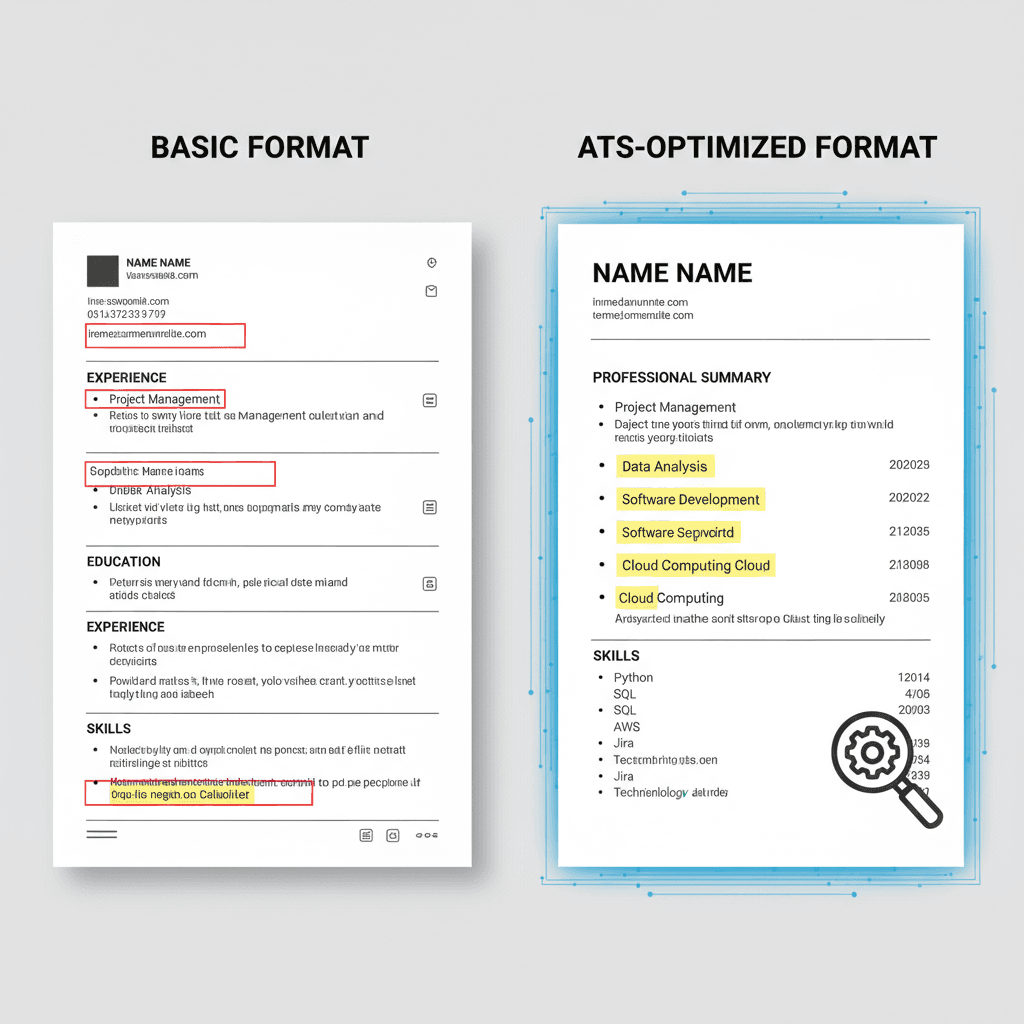
Resume Formatting: 9 Essential Best Practices for ATS Success
Master resume formatting with 9 essential best practices. Learn how to optimize your resume for ATS systems and pass screening to land more interviews.
 Emily Johnson
Introduction
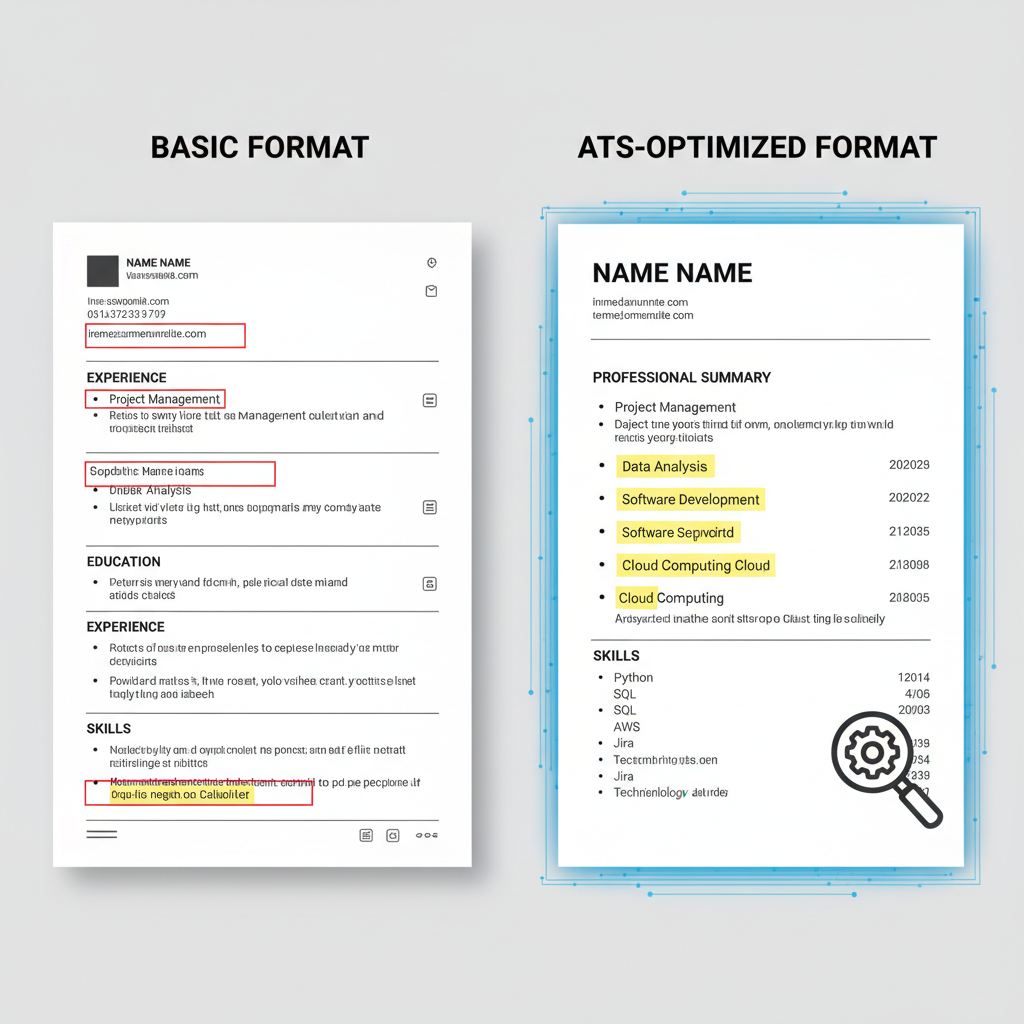
Key Takeaways
- Applicant Tracking Systems (ATS) filter resumes before human recruiters see them, making proper resume formatting essential for job search success
- Simple formatting choices—like avoiding graphics and using standard headings—dramatically improve your chances of passing ATS screening
- Strategic keyword optimization and section organization help both automated systems and hiring managers quickly identify your qualifications
- Testing and tailoring your resume for each application ensures maximum compatibility without sacrificing human readability
As a career strategist, one of the most common challenges I see job seekers face is the daunting task of crafting a resume that not only captures their unique skills and experiences but also passes through Applicant Tracking Systems. Early in my career, I remember working with a talented marketing professional who struggled to get responses from employers. Her resume was filled with creative flair, but it consistently got lost in the ATS filters.
Determined to help her, I dove deep into the world of ATS optimization. We revamped her resume by focusing on ATS-friendly best practices. This involved simplifying the resume formatting to ensure that critical information was easily scannable by the systems. We incorporated industry-specific keywords and phrases naturally throughout her resume to align with the roles she was targeting.
I also learned the importance of avoiding graphics and intricate designs, which, while visually appealing, often hinder ATS parsing. Instead, we used clear, conventional headings and bullet points to structure her achievements and experiences effectively. These changes made a world of difference. A few weeks later, she called me, ecstatic about multiple interview invitations.
That experience solidified my belief in the power of an ATS-optimized resume. It's not just about beating the system—it's about ensuring your resume truly reflects your professional potential in a format that meets both digital and human expectations.
Why Resume Formatting Matters More Than Ever
Today's job market is increasingly automated. Many organizations use ATS software to manage the high volume of applications they receive. These systems scan, parse, and rank resumes based on specific criteria before a human ever reviews them. If your resume isn't formatted correctly, even the most impressive qualifications can be overlooked.
The good news? Understanding how these systems work and applying proven formatting practices can dramatically increase your interview rate. You don't need to sacrifice creativity or personality—you simply need to structure your information in a way that both machines and people can easily process.
What You'll Learn in This Guide
In this comprehensive guide, I'll walk you through nine essential best practices for resume formatting that will help you navigate ATS systems successfully. You'll discover how to structure your resume sections, optimize keywords naturally, avoid common formatting pitfalls, and test your resume's compatibility—all while maintaining a document that impresses human recruiters.
Whether you're actively job searching or preparing for future opportunities, mastering these resume formatting techniques will give you a significant competitive advantage in today's digital hiring landscape.
Sources
- Optimizing Your Resume for AI Scanners - Career Services
- Beat the ATS: Optimize Resumes via Writing & AI: 2026 Guide
Understanding How ATS Systems Work
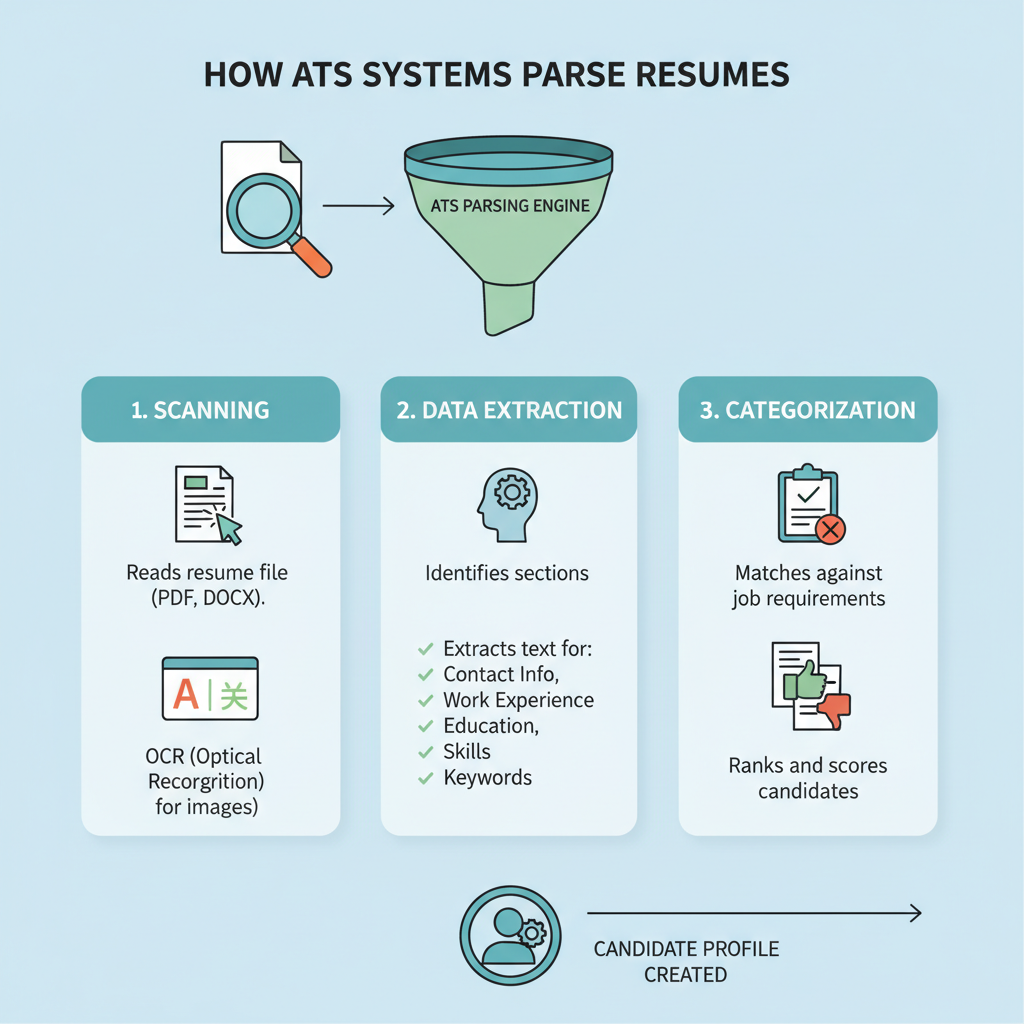
Applicant Tracking Systems are software tools that employers use to collect, organize, and screen resumes before they ever reach human eyes. These systems act as digital gatekeepers, filtering through hundreds or thousands of applications to identify candidates who best match the job requirements.
When you submit your resume, the ATS parses the document by extracting information such as your contact details, work experience, education, and skills. The system then stores this data in a structured format within its database. Recruiters can search and filter candidates based on specific criteria, making it easier to manage large applicant pools.
How ATS Parsing Works
The parsing process involves the ATS reading your resume and attempting to categorize information into predefined fields. The system looks for conventional section headings like "Work Experience," "Education," and "Skills" to understand where different types of information are located.
Using clear, standard headings helps ensure your resume is parsed correctly. When the ATS encounters unconventional formatting, complex layouts, or embedded graphics, it may struggle to extract the right information—or miss it entirely. This is why resume formatting plays such a critical role in getting past these automated screeners.
Why ATS Optimization Matters
Many qualified candidates never make it to the interview stage simply because their resumes aren't optimized for ATS compatibility. The system may fail to recognize your qualifications if they're presented in a format it can't read effectively.
Optimizing your resume for ATS doesn't mean sacrificing quality or authenticity. It means presenting your professional experience in a way that both automated systems and human recruiters can easily understand and evaluate. When your resume passes through the ATS successfully, it has a much better chance of landing on a hiring manager's desk.
By understanding how these systems work, you can make strategic formatting and content decisions that increase your visibility in the applicant pool and improve your chances of securing interviews.
Sources
- Resume Writing Tips That Get Past ATS Systems
- How to Optimize Your Resume for ATS and AI Screening
- How to optimize your resume for Applicant Tracking Systems
Resume Formatting Essentials for ATS Compatibility
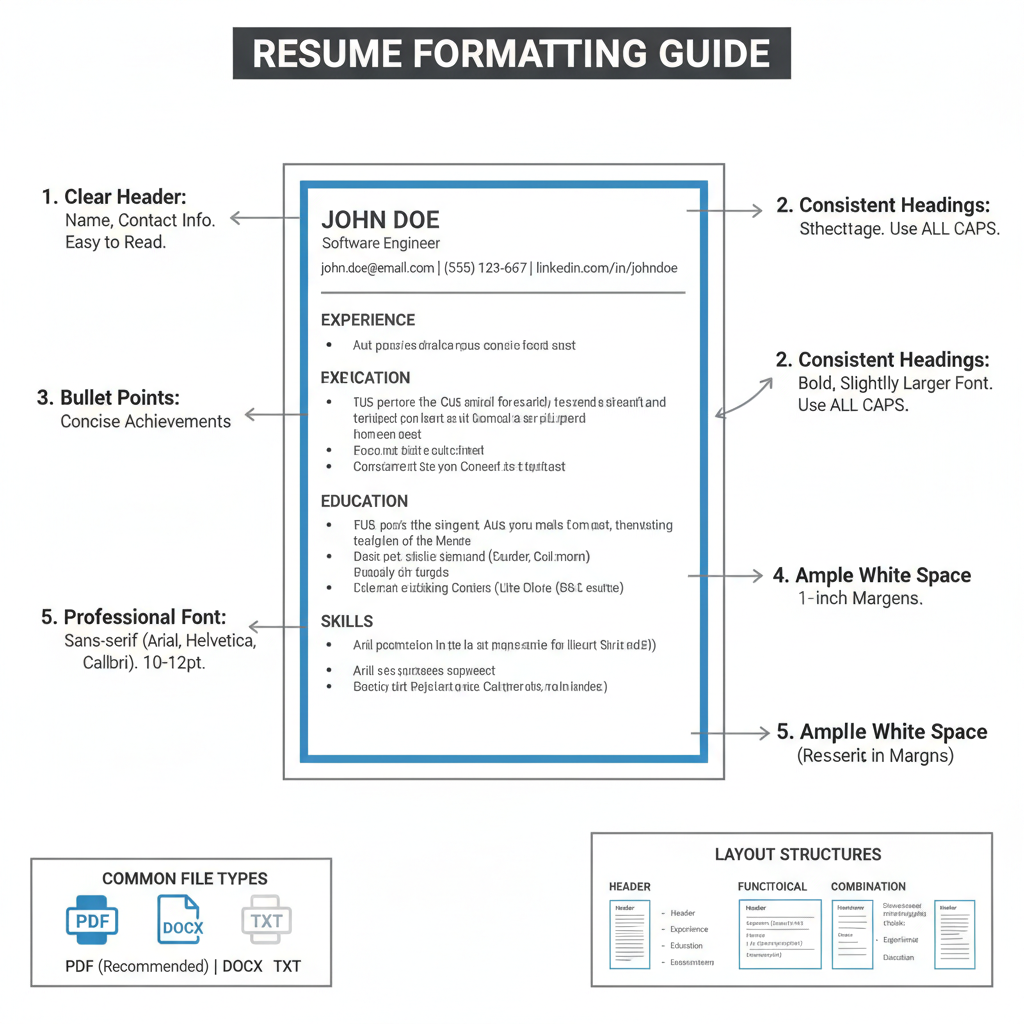
Getting your resume past an ATS starts with proper formatting. The way you structure and present your information can mean the difference between landing an interview and getting filtered out before a human ever sees your qualifications.
Choose the Right File Format
Always submit your resume as a .docx or .pdf file unless the job posting specifies otherwise. Most modern ATS platforms can parse both formats effectively, but .docx files tend to offer the most reliable compatibility across different systems. Avoid using .pages, .odt, or image-based formats, as these can cause parsing errors that scramble your carefully crafted content.
Select ATS-Friendly Fonts
Stick with standard, professional fonts that ATS systems recognize easily. Arial, Calibri, Georgia, and Times New Roman are safe choices that maintain readability across both digital systems and human reviewers. Use a font size between 10 and 12 points for body text, with slightly larger sizes for your name and section headings. Decorative or script fonts may look appealing, but they often confuse parsing algorithms.
Structure With Clear Section Headings
Use conventional section headings that ATS systems expect to find. Label your sections with standard terms like "Work Experience," "Education," "Skills," and "Professional Summary." Avoid creative alternatives like "My Journey" or "What I Bring to the Table," as these can prevent the system from categorizing your information correctly. Clear headings help the ATS map your qualifications to the right fields in its database.
Maintain Proper Margins and Spacing
Set your margins to at least 0.5 inches on all sides, with 0.75 to 1 inch being ideal. Adequate white space helps both ATS parsing and human readability. Use consistent spacing between sections and avoid cramming too much information onto the page. A clean, well-spaced layout ensures that text doesn't run together during the parsing process.
Use a Simple, Single-Column Layout
Multi-column layouts may look sophisticated, but they often cause ATS systems to read information out of order or miss content entirely. Stick with a straightforward, single-column format that presents information in a clear, top-to-bottom flow. This structure ensures that your experience, education, and skills are parsed in the correct sequence.
Avoid Graphics, Tables, and Text Boxes
While visual elements can enhance a resume's appearance, they create significant problems for ATS parsing. Avoid using:
- Headers and footers containing important information
- Tables to organize content
- Text boxes or shapes
- Images, logos, or icons
- Charts or graphs
These elements often become unreadable to ATS systems, causing your information to be lost or misinterpreted. Keep all critical content in the main body of your document using standard text formatting.
Format Dates Consistently
Use a consistent date format throughout your resume, such as "January 2020 – March 2023" or "01/2020 – 03/2023." Avoid abbreviations that might confuse parsing algorithms, and always include both start and end dates for each position. If you're currently employed, use "Present" rather than leaving the end date blank.
Use Standard Bullet Points
Format your achievements and responsibilities using simple round or square bullet points. Avoid using special characters, symbols, or custom bullet designs that ATS systems may not recognize. Standard bullets help organize your information in a scannable format that both systems and hiring managers appreciate.
Save and Name Your File Properly
Before submitting, save your resume with a professional file name that includes your name, such as "Emily_Johnson_Resume.docx." Avoid generic names like "Resume.pdf" or "MyResume.docx," which can get lost among hundreds of other applications. A clear file name helps recruiters locate your document quickly if they need to reference it later.
Sources
- ATS Resume Format 2026: Latest Formatting Best Practices
- Professional resume templates optimized for ATS
- Beat The ATS With The Best Resume Optimization Checklist
Strategic Keyword Optimization Without Stuffing
Keyword optimization is one of the most critical elements of resume formatting for ATS success. The challenge lies in incorporating relevant terms naturally while avoiding the robotic feel of keyword stuffing that both ATS algorithms and human recruiters can detect.
Identifying the Right Keywords
Start by carefully analyzing the job description for the position you're targeting. Look for recurring terms, required skills, and specific qualifications mentioned multiple times. These repetitions signal priority to employers and should guide your keyword selection.
Pay attention to three types of keywords: hard skills (technical abilities and certifications), soft skills (communication, leadership, teamwork), and industry-specific terminology. Each category plays a role in how ATS systems score your resume against job requirements.
Natural Integration Strategies
Once you've identified relevant keywords, integrate them throughout your resume in context. Rather than creating a separate "keywords" section, weave terms into your professional summary, work experience descriptions, and skills section where they genuinely reflect your qualifications.
Use keywords in their various forms when appropriate. If a job description mentions "project management," you might naturally include "managed projects," "project manager," and "project management" in different sections. This variation demonstrates authentic experience while improving your match score.
Avoiding Keyword Stuffing Pitfalls
Keyword stuffing—the practice of cramming terms into your resume without context—damages both your ATS score and human readability. Modern ATS systems can detect unnatural keyword density and may flag resumes that appear manipulative.
Instead, focus on achievement-based statements that naturally incorporate keywords. For example, rather than listing "customer service" five times, write: "Enhanced customer service protocols, resulting in improved client satisfaction." This approach demonstrates real experience while including the target keyword.
Matching Job Description Language
Use the exact phrasing from job descriptions when it accurately reflects your experience. If an employer seeks "data analysis" rather than "data analytics," mirror their terminology. ATS systems often search for precise matches, and this attention to detail can significantly impact your ranking.
However, maintain authenticity. Never claim skills or experience you don't possess simply to match keywords. The goal is to present your genuine qualifications in language that resonates with both ATS algorithms and hiring managers.
Balancing Keywords Across Sections
Distribute keywords strategically across all resume sections. Your professional summary should contain high-priority terms, while your work experience section provides opportunities to demonstrate those skills in action. The skills section offers a final keyword boost for terms that may not fit naturally elsewhere.
Remember that resume formatting extends beyond layout to include the strategic placement of relevant terminology. A well-optimized resume uses keywords purposefully, creating a narrative that satisfies ATS requirements while compelling human readers to learn more about your qualifications.
Sources
- Cracking the ATS Code—Why It Matters Now More Than Ever
- Make Your Resume AI-Friendly: Expert ATS Optimization
- 12 Resume Formatting Best Practices for ATS Systems
Organizing Resume Sections for Maximum ATS Optimization
The way you structure your resume sections can make or break your chances of passing through an ATS. These systems are programmed to recognize specific section headings and parse information accordingly. Using unconventional labels or mixing up the traditional order can confuse the software, causing it to misfile or overlook your qualifications entirely.
Start with standard section headings that ATS systems universally recognize. The most reliable headings include Contact Information, Professional Summary or Objective, Work Experience, Education, and Skills. Avoid creative alternatives like "My Journey" instead of Work Experience or "What I Bring to the Table" instead of Skills. While these may seem engaging to human readers, they create parsing errors in automated systems.
Standard Section Order for ATS Success
The optimal resume structure follows a predictable pattern that aligns with how ATS systems are programmed to extract data. Begin with your contact information at the top, followed by a brief professional summary. Next, place your work experience section, which typically carries the most weight in ATS algorithms. Your education section should follow, then skills, and finally any additional sections like certifications or volunteer work.
This traditional order isn't arbitrary. ATS systems are designed to prioritize information based on where it appears in your document. Placing your work experience early ensures that your most relevant professional achievements are captured and weighted appropriately during the initial screening process.
Formatting Section Headings
Keep your section headings simple and clearly formatted. Use standard fonts and avoid decorative elements like lines, borders, or shading around headings. The ATS needs to identify where one section ends and another begins, and visual embellishments can interfere with this process.
Stick to straightforward heading labels without unnecessary punctuation or symbols. For example, use "Work Experience" rather than "Work Experience:" or "** Work Experience **". Clean, unadorned headings allow the ATS to categorize your information accurately.
Organizing Content Within Sections
Within each section, maintain a consistent structure that the ATS can easily parse. For work experience entries, always include your job title, company name, location, and dates of employment in a clear format. List your responsibilities and achievements using bullet points rather than dense paragraphs.
Bullet points are ATS-friendly and help both the system and human readers quickly identify key information. Avoid using tables or text boxes to organize content within sections, as these formatting elements often cause parsing errors that result in lost information.
Sources
- Optimizing Your Resume for Applicant Tracking Systems
- How to Optimize Your Resume for ATS in 2026 (Updated Guide)
Common ATS Mistakes That Cost You Interviews
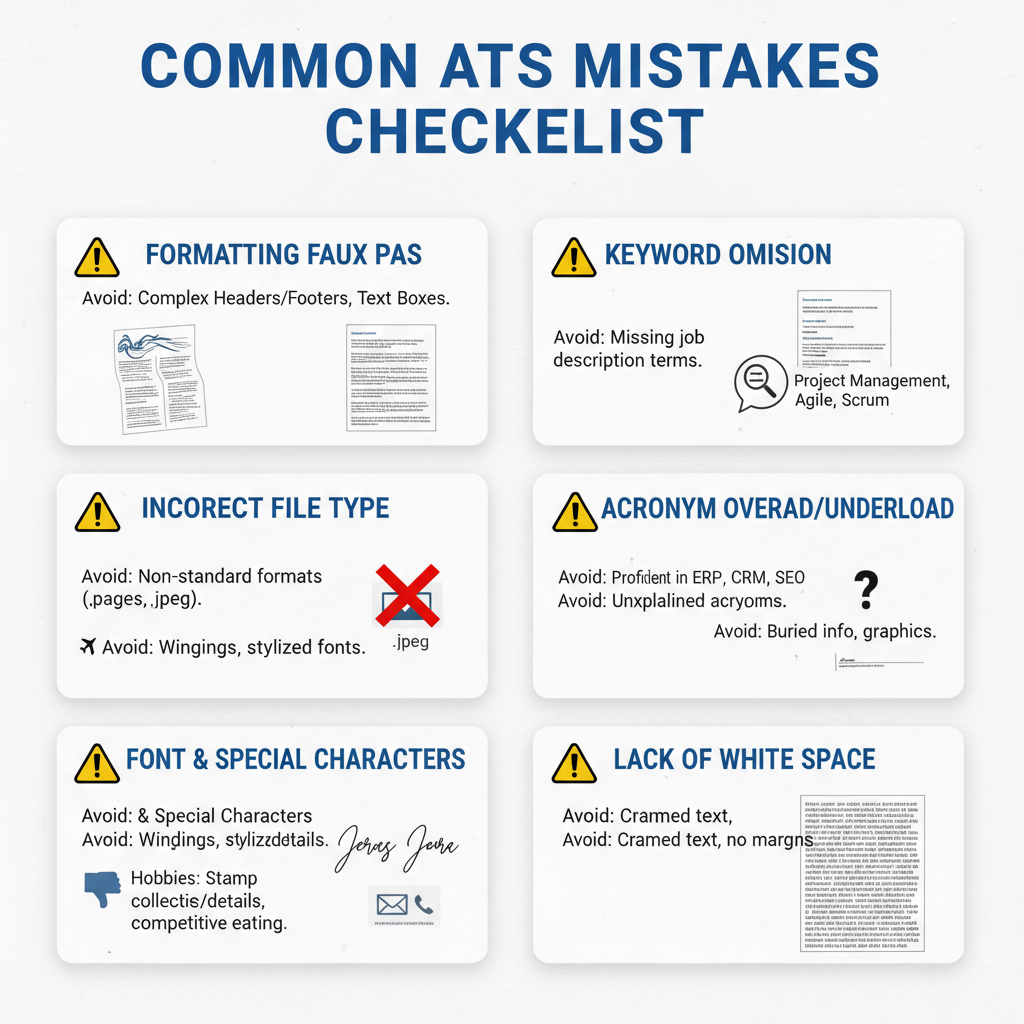
Even qualified candidates can lose opportunities when their resumes contain formatting elements that confuse ATS systems. Understanding these common pitfalls helps you avoid unnecessary rejection before a human ever sees your application.
Graphics, Images, and Visual Elements
While creative designs may look impressive to the human eye, ATS systems cannot read graphics, photos, logos, or charts. These visual elements often cause parsing errors, resulting in missing or garbled information. Stick to text-based content exclusively to ensure your qualifications are properly captured.
Tables and Complex Formatting Structures
Tables pose significant challenges for ATS parsing. When you organize information in table cells, the system may read content in the wrong order or skip sections entirely. This applies to multi-column layouts as well, which can scramble your carefully crafted content into an unreadable mess.
Instead of tables, use simple bullet points and standard paragraph formatting. This approach ensures your information flows logically when the ATS extracts and processes it.
Headers, Footers, and Text Boxes
Many ATS platforms ignore content placed in headers and footers completely. If you've included your contact information, page numbers, or other critical details in these areas, they may never reach the hiring manager. Always place essential information in the main body of your document.
Text boxes create similar problems. Content within text boxes often gets skipped during parsing, leaving gaps in your professional narrative.
Unconventional Section Headings
Using creative or non-standard section titles can prevent ATS systems from properly categorizing your information. Labels like "My Journey" or "What I Bring to the Table" may confuse the software, which looks for conventional headings like "Work Experience" and "Education."
Stick to traditional, recognizable section names that align with what ATS systems expect to find.
Inconsistent Date Formatting
Inconsistent date formats throughout your resume can trigger parsing errors. Switching between formats like "January 2020," "01/2020," and "Jan '20" creates confusion. Choose one clear format and apply it consistently across all entries.
Poor Keyword Optimization
Failing to incorporate relevant keywords naturally throughout your resume means the ATS may not identify you as a match for the position. Review the job description carefully and ensure your resume reflects the terminology and skills the employer is seeking, without resorting to keyword stuffing.
Special Characters and Symbols
Decorative symbols, unusual bullet styles, and special characters can cause ATS systems to misread your content. Use standard round bullets and avoid ornamental elements that serve no functional purpose.
Improper File Format
Submitting your resume in an incompatible file format is one of the easiest mistakes to avoid. Unless the job posting specifically requests otherwise, use .docx or PDF formats. Avoid uncommon file types that ATS systems may not support.
By eliminating these common errors, you significantly increase your chances of passing ATS screening and getting your resume in front of decision-makers.
Sources
Tailoring Your Resume for Each Job Application
One of the most effective strategies for improving your resume formatting and ATS success is customization. Sending the same generic resume to every employer significantly reduces your chances of passing ATS screening and catching a hiring manager's attention.
Every job posting contains unique requirements, preferred qualifications, and specific language that reflects what the employer values most. When you tailor your resume to mirror these elements, you demonstrate that you've taken time to understand the role and can clearly articulate how your experience aligns with their needs.
Why Customization Matters for ATS
Applicant tracking systems scan your resume for keywords and phrases that match the job description. A resume optimized for one position may lack the specific terminology needed for another role, even within the same field. By customizing your resume for each application, you increase the keyword match rate that ATS algorithms use to rank candidates.
Tailoring also helps you prioritize relevant experience. The accomplishments and skills most important for one position may differ from those needed for another, even if both fall under your expertise area.
How to Align Your Resume with Job Requirements
Start by carefully reading the job posting and identifying key requirements, qualifications, and responsibilities. Look for repeated terms, required skills, and specific credentials mentioned multiple times—these signal priority to the employer.
Next, review your current resume and identify where your experience matches these requirements. Adjust your professional summary, skills section, and work experience descriptions to emphasize relevant achievements using similar language to the job posting.
For example, if a job description emphasizes "cross-functional team leadership" rather than "project management," use their preferred terminology when describing your relevant experience. This strategic alignment improves both ATS matching and human readability.
Efficient Methods for Resume Tailoring
Create a master resume document that contains all your experience, skills, and accomplishments in detail. This comprehensive version serves as your source material for customized versions.
For each application, save a copy and modify it to highlight the most relevant 70-80% of content while removing or condensing less applicable information. Focus your edits on:
- Professional summary or objective statement
- Skills section keywords
- Achievement bullets under each position
- Section order and emphasis
Develop a system for tracking which version you submitted to each employer. A simple spreadsheet noting the company, position, date applied, and file name helps you stay organized and reference the correct version for follow-up communications.
Balancing Efficiency with Effectiveness
While thorough customization yields the best results, you can work more efficiently by creating 2-3 base templates for different types of roles you're pursuing. Each template should emphasize different skill sets and experiences relevant to that career path.
From these templates, make targeted adjustments for individual applications rather than starting from scratch each time. This approach maintains quality while reducing the time investment per application.
Sources
- Optimizing Your Resume for Applicant Tracking Systems
- Optimizing Your Resume for Applicant Tracking Systems
Testing Your Resume's ATS Compatibility
Before submitting your resume to potential employers, testing its ATS compatibility can save you from missed opportunities. Many qualified candidates never reach human reviewers simply because their resumes fail to parse correctly through applicant tracking systems.
Testing your resume formatting helps you identify potential issues before they cost you interviews. By running compatibility checks, you can ensure that the critical information you've carefully crafted actually reaches hiring managers.
File Conversion Testing
One of the simplest ways to test your resume is through file conversion. Save your resume as a plain text (.txt) file and review the output. This basic test reveals how an ATS might interpret your formatting.
When you open the plain text version, check whether your contact information, work history, and skills remain clearly organized. If sections appear jumbled or information is missing, your original formatting likely contains elements that ATS systems struggle to parse.
Additionally, convert your resume to different formats and compare the results. A well-formatted resume should maintain its structure whether saved as a .docx or PDF file.
Using Online ATS Scanners
Several online tools can simulate how ATS systems read your resume. These scanners analyze your document and provide feedback on potential compatibility issues.
When using these tools, pay attention to:
- Whether all sections are correctly identified
- If your contact information is properly extracted
- How well your skills and keywords are recognized
- Whether dates and job titles parse accurately
These scanners typically evaluate your resume against common ATS requirements and highlight areas that need improvement. While not perfect replications of every ATS system, they provide valuable insights into potential parsing problems.
Readability Assessment Methods
Beyond automated tools, manual readability checks help ensure your resume formatting serves both systems and humans. Ask yourself whether each section uses clear, conventional headings that ATS systems recognize.
Review your resume for:
- Standard section titles like "Work Experience" and "Education"
- Consistent date formatting throughout
- Simple bullet points rather than complex symbols
- Clear separation between different roles and responsibilities
Consider having a colleague review your resume in different viewing modes. If they can quickly locate your key qualifications, ATS systems likely can too.
Testing Keyword Recognition
Your resume formatting should support keyword recognition, not hinder it. Test this by searching for specific terms within your document using the find function.
If keywords appear in tables, text boxes, or headers, they may not be properly indexed by ATS systems. Move critical keywords into the main body text where systems can reliably detect them.
Compare your resume against job descriptions for roles you're targeting. Ensure that relevant keywords appear in context and that your resume formatting doesn't obscure them from automated scanning.
Iterative Testing and Refinement
Testing your resume isn't a one-time task. As you apply to different positions, continue refining your approach based on results. If you're not receiving responses despite strong qualifications, your resume formatting may need adjustment.
Make incremental changes and test each version. Document what works and what doesn't. This iterative approach helps you develop a resume that consistently passes ATS filters while showcasing your professional strengths.
Sources
Balancing ATS Requirements with Human Appeal
Optimizing your resume for ATS systems is essential, but remember that your ultimate audience is human. The most effective resumes strike a balance between machine readability and compelling storytelling that resonates with hiring managers. Your goal is to pass the digital gatekeeper while creating a document that makes recruiters excited to call you.
Start by thinking of ATS optimization as your foundation, not your ceiling. Use clean formatting, standard fonts, and clear section headings to ensure your resume parses correctly. Then layer in strategic content that showcases your unique value proposition. Strong action verbs, quantifiable achievements, and context-rich descriptions transform a technically sound resume into a persuasive career narrative.
Writing for Both Audiences Simultaneously
The key is integrating keywords naturally within achievement-focused bullet points. Instead of listing duties, frame your experience around results. For example, rather than writing "Responsible for social media management," try "Developed social media strategy that increased engagement by implementing targeted content campaigns." This approach satisfies keyword requirements while demonstrating impact to human readers.
Avoid the temptation to create separate versions for ATS and humans. A well-crafted resume serves both purposes effectively. Focus on clarity, relevance, and results. Use industry-standard terminology that both systems and recruiters recognize, and ensure every line adds value to your professional story.
Visual Hierarchy Without ATS Barriers
You can create visual appeal within ATS-friendly constraints. Strategic use of white space, consistent formatting, and logical section organization guide the human eye without confusing parsing software. Bold text for company names and job titles adds emphasis while remaining machine-readable. Simple horizontal lines can separate sections without causing technical issues.
Consider how your resume appears at first glance. Recruiters typically spend just seconds on initial screening, so your most impressive achievements should be immediately visible. Place your strongest qualifications near the top of each section, and use concise formatting that allows quick scanning while maintaining comprehensive detail.
The Power of Strategic Storytelling
While ATS systems scan for keywords and credentials, human recruiters look for patterns of growth, problem-solving ability, and cultural fit. Weave these elements into your experience descriptions without sacrificing technical optimization. Show progression in your career through increasingly responsible roles or expanding skill sets.
Your resume should answer the recruiter's unspoken questions: Can this person do the job? Will they add value to our team? Do their achievements suggest they'll succeed in this role? Address these concerns through specific examples that demonstrate both competence and initiative, all while maintaining the clean structure that ATS systems require.
Maintaining Authenticity
Never sacrifice accuracy or authenticity for optimization. Keyword stuffing or exaggerating qualifications may pass initial ATS screening but will fail during human review or interviews. Focus on genuine strengths and legitimate accomplishments. The most effective resumes honestly represent your professional identity while presenting it in the most favorable, relevant light.
Remember that passing ATS is just the first step. Your resume must then convince a recruiter to invest time in a phone screen, and ultimately persuade a hiring manager to extend an interview invitation. By creating a document that satisfies technical requirements while engaging human readers, you maximize your chances at every stage of the hiring process.
Sources
Conclusion
Mastering resume formatting for ATS compatibility is no longer optional in today's competitive job market—it's essential. Throughout this guide, we've explored nine critical best practices that will help your resume successfully navigate Applicant Tracking Systems while maintaining the professional appeal that impresses human recruiters.
The key to ATS success lies in understanding that simplicity and clarity are your greatest allies. By using simple formatting, avoiding headers and footers, steering clear of tables and complex templates, and maintaining conventional fonts and structures, you create a resume that both machines and hiring managers can easily process. Remember that bullet points are acceptable, but fancy symbols, shading, and font colors beyond standard black should be avoided.
Early in my career, I witnessed firsthand how these principles transformed outcomes for job seekers. One talented professional I worked with struggled to get responses despite impressive qualifications. We simplified her resume formatting, incorporated industry-specific keywords naturally, and removed the creative elements that hindered ATS parsing. Within weeks, she received multiple interview invitations. That experience reinforced my belief that an ATS-optimized resume isn't about gaming the system—it's about ensuring your professional potential shines through in a format that meets both digital and human expectations.
As you implement these strategies, prioritize clear structure, job-specific keywords, and standard file formats. A modern ATS-ready resume focuses on these fundamentals to pass filters and reach hiring managers effectively.
Take action today. Review your current resume against the best practices outlined in this guide. Make the necessary adjustments to improve your ATS compatibility, and remember that each application deserves customization to match the specific role you're pursuing. Your next career opportunity may be just one optimized resume away.
Sources
- Optimizing Your Resume for Applicant Tracking Systems
- How to Optimize Your Resume for ATS in 2026 (Updated Guide)
Related reading: Employer Demands: 12 Essential Skills for the Best Career

Written by
Emily Johnson
Published February 21, 2026 · 25 min read
Emily Johnson is a seasoned career strategist with over a decade of experience in recruitment and talent acquisition. With a background in human resources, she excels at helping professionals refine their job search strategies, from crafting compelling resumes to mastering interview techniques. As an expert in Applicant Tracking Systems (ATS), Emily is dedicated to guiding individuals toward their dream careers.
Want this kind of read on your résumé?
We'll tell you what's actually working, what's holding you back, and what to fix — in plain English.
Get My Job Match Score