

Resume Layout Tips: 9 Essential and Easy Strategies
Master resume layout tips with 9 essential strategies. Learn proven techniques to create effective, professional resumes that stand out to employers.
 Emily Johnson
Introduction
Key Takeaways
- About 75% of resumes never make it past applicant tracking systems, meaning most qualified candidates are filtered out before human review
- Nearly 99% of Fortune 500 companies use ATS software to manage their hiring processes, making ATS-friendly formatting essential
- Simple, clean resume layouts with standard fonts and clear section headings dramatically outperform visually complex designs
- Understanding how to format for both software parsing and human readability is the key to landing more interviews
- Small formatting changes can transform callback rates within weeks, even with the same qualifications and experience
I'll never forget the day a frustrated job seeker walked into my office with a beautifully designed resume—complete with colorful graphics, text boxes, and creative fonts. She'd applied to over fifty positions without a single callback. Within minutes, I knew exactly what the problem was: her stunning resume was invisible to the ATS systems screening her applications.
That moment crystallized something I'd been seeing for years in recruitment. Even the most qualified candidates were being filtered out before human eyes ever saw their credentials. The transformation in my clients' callback rates was remarkable once we addressed the formatting issues. One client went from zero responses to three interviews within two weeks—same qualifications, same experience, just better formatting.
The reality is stark: hiring managers spend less than a minute scanning your resume once it passes the digital gatekeeper. Your resume needs to survive automated screening first, then capture human attention quickly. This dual challenge requires a specific approach to layout and structure.
Why Resume Layout Tips Matter More Than Ever
The hiring landscape has fundamentally changed. What worked five years ago—creative templates, visual elements, and unique formatting—now works against you. ATS software can't read text embedded in graphics, struggles with unusual fonts, and often misses information tucked into headers or footers.
This doesn't mean your resume should be boring. It means understanding that effective resume design isn't about sacrificing aesthetics entirely. It's about making strategic choices that satisfy both software requirements and human preferences. Clean doesn't mean bland—it means readable, scannable, and optimized for the systems that stand between you and your next opportunity.
What You'll Learn in This Guide
This article breaks down nine essential resume layout tips that will help you navigate ATS systems successfully. You'll discover which resume formats work best, how to structure your sections for maximum readability, and which common mistakes cost candidates interviews every day.
Whether you're updating an existing resume or starting from scratch, these strategies will help you create a document that passes automated screening while still impressing the hiring managers who ultimately make the decision. The goal isn't just to get past the ATS—it's to position yourself as the standout candidate you are.
Sources
What Is ATS and Why Your Resume Format Matters More Than Ever
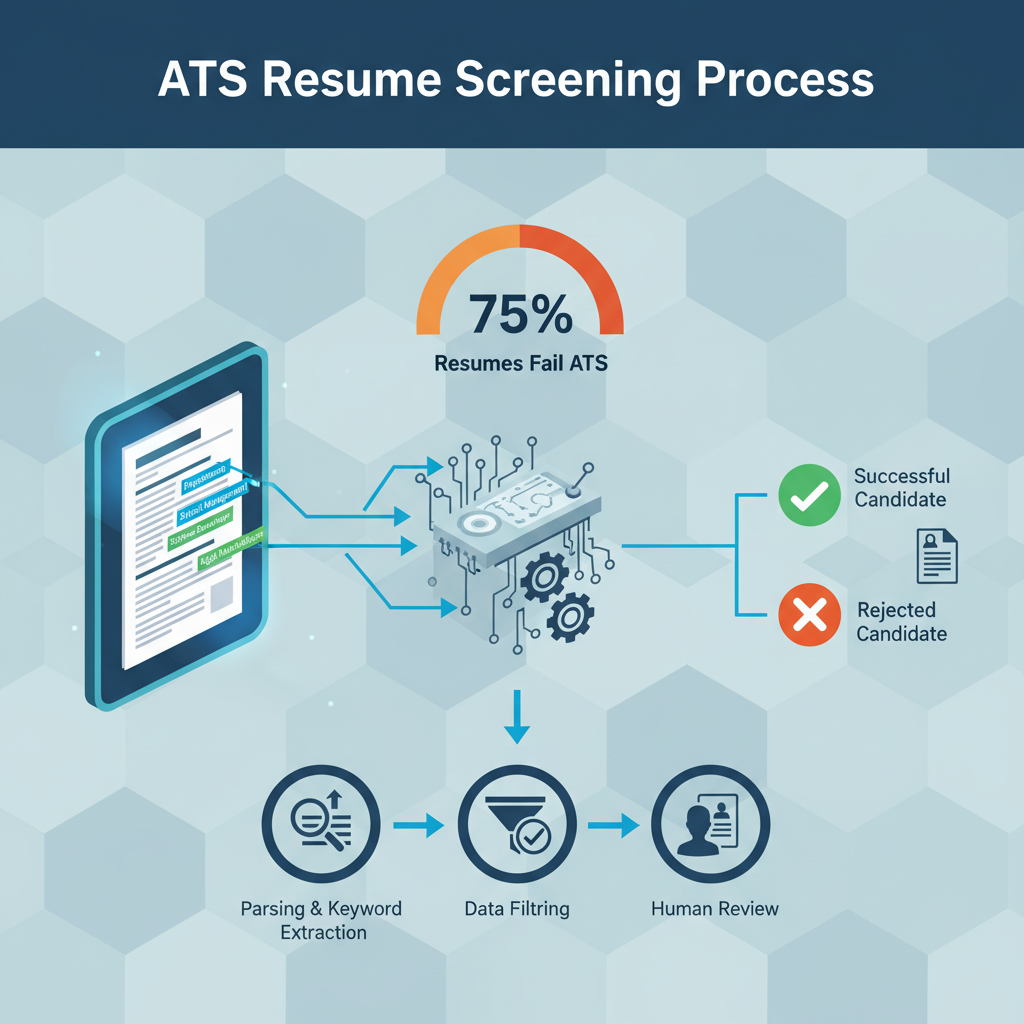
Applicant Tracking Systems (ATS) are software platforms that companies use to manage the hiring process. These systems automatically scan, parse, and rank resumes before human recruiters ever see them. Think of ATS as a digital gatekeeper that reads your resume and decides whether you're qualified enough to move forward.
Here's the reality that changed how I coach every client: nearly 99% of Fortune 500 companies depend on ATS software to simplify their hiring processes. These aren't just tools for massive corporations anymore—mid-sized companies and even smaller organizations now rely on this technology to handle the volume of applications they receive.
How ATS Systems Parse Your Resume
When you submit your resume, the ATS doesn't see it the way you do. Instead, it breaks down your document into data fields—extracting your contact information, work history, education, and skills. The software scans for specific keywords that match the job description and organizes everything into categories.
This parsing process is where most resumes fail. If your formatting confuses the system, critical information gets lost or misread. A beautifully designed resume with graphics, text boxes, or unusual fonts might look impressive to you, but it's often invisible to the software doing the initial screening.
The Stakes: Why 75% of Resumes Never Reach Human Eyes
About 75% of resumes never make it past applicant tracking systems before reaching hiring managers. That's three out of every four applications filtered out automatically—not because candidates lack qualifications, but because their resume format prevented the ATS from recognizing their credentials.
The transformation in callback rates I've witnessed when clients fix their formatting is remarkable. Same qualifications, same experience, just better structure—and suddenly they're getting interviews. The key isn't dumbing down your resume; it's making it readable for both software and humans.
ATS systems rank candidates based on how well their resumes match the job requirements. If the software can't parse your information correctly, you receive a low score regardless of your actual fit for the role. This filtering happens before any recruiter reviews your application, which means formatting mistakes cost you opportunities before you even have a chance to compete.
Understanding this reality is the first step toward creating resume layout tips that actually work in today's job market. Format for the machine first, write for the person second—master both, and you'll dramatically improve your chances of landing that interview.
Sources
The Core Principles of ATS-Friendly Resume Formats
Mastering the fundamentals of ATS-friendly formatting is essential before diving into advanced optimization strategies. These core principles form the foundation that ensures your resume passes through applicant tracking systems successfully.
Stick to Standard Fonts and Simple Formatting
Your resume needs to be readable by parsing software first, which means avoiding anything that might confuse the system. Use standard fonts like Arial, Calibri, or Times New Roman in sizes between 10 and 12 points. These fonts are universally recognized and parse reliably across different ATS platforms.
Avoid fancy design elements that might look impressive to human eyes but create chaos for software. This includes text boxes, tables with merged cells, columns, and any complex formatting structures. Stick to simple bullet points instead of decorative symbols or custom graphics.
Eliminate Visual Elements Completely
ATS systems cannot parse images, charts, graphs, or any visual elements. When the software encounters these components, it either skips over them entirely or produces garbled text that misrepresents your qualifications. Remove all graphics, logos, headshots, and infographics from your resume.
This doesn't mean your resume has to look boring—it means prioritizing clarity and readability over visual flair. A clean design with clear hierarchy helps ATS systems parse your content into proper categories while still appearing professional to human reviewers.
Keep Critical Information Out of Headers and Footers
One of the most common formatting mistakes is placing important details in headers or footers. Many ATS systems don't parse these sections correctly, which means your contact information, job titles, or other key details might never reach the database.
Place all essential information—your name, phone number, email address, work history, and skills—in the main body of your resume. Use standard section headings that ATS software recognizes to organize this information logically.
Choose the Right File Format
While we'll cover file format best practices in detail later, the fundamental principle is simple: save your resume as a .docx or .pdf file unless the job posting specifically requests a different format. These formats are most reliably parsed by modern ATS platforms.
Avoid submitting your resume as a .jpg, .png, or other image file, as these cannot be parsed at all. Similarly, highly formatted documents created in design software often fail to translate correctly when processed by applicant tracking systems.
Sources
Choosing the Right Resume Layout: Chronological, Functional, or Hybrid
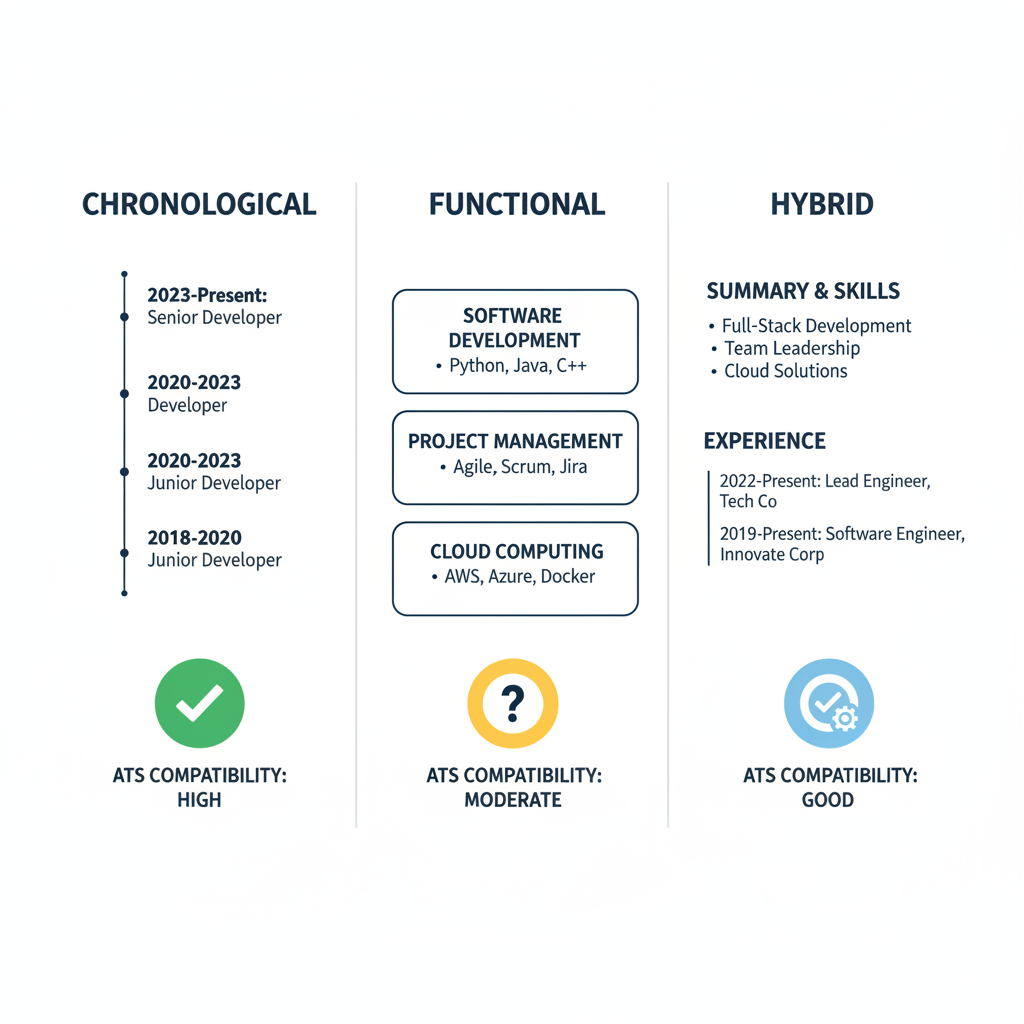
Your resume layout choice directly impacts whether applicant tracking systems can properly parse your information. The three main format types—reverse chronological, functional, and combination (hybrid)—each offer different advantages, but they're not all equally ATS-friendly.
Reverse Chronological: The ATS Gold Standard
The reverse chronological format is the most employer-friendly and ATS-compatible option available. This layout puts your most recent positions at the top and works backward through your career history, making it easy for both hiring managers and parsing software to track your career progression.
ATS systems recognize this format because it follows a predictable structure: job title, company name, dates, and responsibilities appear in a consistent pattern. The software can reliably extract employment dates and job titles without confusion.
This format works best when you have:
- Steady employment history in the same field
- Clear career progression showing growth
- Recent experience directly relevant to the target position
- No significant employment gaps that need explanation
Functional Format: Proceed With Caution
Functional resumes organize content by skills rather than chronological work history. While this might seem appealing if you're changing careers or have employment gaps, recruiters often view these formats with skepticism because they hide employment dates and job titles.
More importantly for ATS purposes, functional formats confuse parsing algorithms. When the software can't find employment dates in expected locations or struggles to match job titles with companies, it may misfile your information or flag your resume as incomplete.
I rarely recommend functional formats today. The risks of ATS misinterpretation outweigh the benefits of disguising career gaps. If you're concerned about employment history issues, address them in your cover letter rather than compromising your resume's parseability.
Combination (Hybrid) Format: The Balanced Approach
The combination format blends skills and experience, offering a middle ground that can work well with ATS systems when structured properly. This layout typically features a skills summary at the top, followed by reverse chronological work history.
This format proves ideal for:
- Career changers who need to highlight transferable skills
- Recent graduates with strong projects but limited work history
- Technical professionals showcasing specific competencies
- Candidates with diverse backgrounds requiring context
The key to making hybrid formats ATS-friendly is maintaining clear section divisions and including complete employment history with dates. Don't sacrifice chronological work details for skills emphasis—include both.
Making Your Layout Choice
For most job seekers, the reverse chronological format offers the safest path through ATS screening. It's the expected standard, parses reliably, and meets recruiter expectations. Unless you have compelling reasons to choose differently, start here.
If your situation demands a combination format, structure it with ATS compatibility in mind: use standard section headings, maintain chronological employment listings, and ensure dates and job titles appear in predictable locations. The goal is balancing your need to highlight relevant skills with the system's need for structured data.
Avoid functional formats entirely when applying through ATS systems. The parsing challenges they create aren't worth the minimal benefit they provide.
Sources
Section Headings and Structure That ATS Systems Recognize
ATS systems are programmed to look for specific section headings when parsing your resume. Using standard, recognizable labels ensures the software correctly categorizes your information and presents it to hiring managers. Creative or unconventional headings might look appealing, but they often confuse parsing algorithms, causing your qualifications to be misclassified or overlooked entirely.
Standard Section Headings ATS Systems Expect
Stick with conventional section titles that ATS software is trained to recognize. The most reliable headings include:
- Work Experience (or Professional Experience, Employment History)
- Education
- Skills (or Core Competencies, Technical Skills)
- Certifications (if applicable)
- Summary (or Professional Summary, Profile)
Avoid creative alternatives like "My Journey," "Where I've Been," or "What I Bring to the Table." These headings may seem engaging to human readers, but they leave ATS systems unable to properly categorize your information.
Recommended Resume Structure and Ordering
A well-organized, ATS-friendly resume follows a logical hierarchy that both software and recruiters expect. The recommended structure includes:
- Header — Your name and contact information at the top
- Resume Headline — A brief statement immediately communicating your professional value
- Core Competencies — Key skills relevant to the position
- Professional Experience — Your work history in reverse chronological order
- Education — Degrees, institutions, and graduation dates
This five-section framework ensures ATS systems can easily locate and parse each component of your background. Place your most relevant qualifications early in the document, as some ATS platforms prioritize information appearing in the first half of your resume.
Critical Formatting Guidelines for Resume Layout Tips
Keep all essential information in the main body of your document. ATS systems frequently fail to parse headers and footers correctly, which means contact details, job titles, or dates placed in these areas may be lost entirely. Position your name, phone number, email, and LinkedIn profile at the top of the page within the standard document body.
Use clear visual hierarchy with consistent formatting. Each section heading should be easily distinguishable, typically through bold text or slightly larger font size. Maintain uniform spacing between sections and use standard bullet points for listing responsibilities and achievements under each role.
Avoid tables, text boxes, columns, or graphics within your resume content. While these design elements create visual appeal, they confuse ATS parsing software, often scrambling your information or rendering it unreadable. A single-column layout with straightforward text formatting is your safest choice.
Adding a Resume Headline for Better ATS Performance
Include a resume headline immediately below your contact information to improve keyword matching and quickly communicate your professional identity. This brief statement—typically one or two lines—should highlight your role, experience level, and key value proposition.
For example: "Senior Marketing Manager with 8+ Years Driving Digital Strategy and Revenue Growth" or "Certified Project Manager Specializing in Agile Software Development."
This headline serves dual purposes: it helps ATS systems identify relevant keywords early in your document, and it gives human reviewers an immediate understanding of your professional focus.
Sources
Formatting Work Experience and Dates for Maximum ATS Readability
Your work experience section is where ATS systems extract the most critical information about your career history. Format it incorrectly, and even the most impressive background can become invisible to the software parsing your resume.
Standard Work Experience Structure
ATS systems expect a consistent format for each position. Start with your job title on the first line, followed by the company name and location on the second line, with employment dates clearly displayed. This hierarchy helps the software correctly categorize each element of your work history.
Avoid combining multiple pieces of information on a single line with creative separators. While "Marketing Manager | ABC Company | 2020-2023" might look clean to human eyes, it can confuse parsing algorithms that expect distinct fields.
Date Format Best Practices
Consistency in date formatting is essential for ATS readability. Use standard formats like "January 2020 – March 2023" or "01/2020 – 03/2023" throughout your entire resume. Mixing formats signals inconsistency to the software and may cause parsing errors.
Always include both start and end dates for each position. If you're currently employed, use "Present" rather than leaving the end date blank. ATS systems are programmed to recognize this convention and will correctly calculate your tenure.
Avoid abbreviations that might confuse the software. While "Jan" or "Sept" are commonly understood by humans, spell out month names fully to ensure accurate parsing.
Formatting Bullet Points for Resume Layout Tips
Simple bullet points are your best friend when formatting work experience. Use standard round bullets (•) rather than decorative symbols, checkmarks, or custom graphics that ATS systems cannot interpret.
Each bullet point should begin with a strong action verb and focus on quantifiable achievements when possible. Keep bullets concise—two lines maximum—to maintain readability for both software and human reviewers.
Start each bullet point flush left with consistent indentation. Avoid nested bullets or multiple indentation levels, which can scramble your content during parsing.
Company Names and Job Titles
Always spell out company names completely on first mention. If you worked at "IBM," write "International Business Machines (IBM)" to ensure the ATS captures the full legal entity name. For subsequent mentions within the same position, the acronym alone is acceptable.
Job titles should match industry-standard terminology whenever possible. If your official title was unconventional (like "Marketing Ninja"), consider using a more recognized equivalent ("Marketing Specialist") that ATS systems and recruiters will understand and search for.
Common Formatting Mistakes to Avoid
Tables and text boxes are major culprits in ATS parsing failures. While they create visual appeal, most ATS systems cannot extract information from these elements correctly. Stick to simple, linear formatting with clear line breaks between positions.
Headers and footers should never contain critical work experience information. Many ATS systems ignore these areas entirely, meaning any employment details placed there will be lost during parsing.
Avoid using special characters or symbols to separate information. Pipes (|), slashes (/), and other decorative elements may cause the software to misread your dates, titles, or company names.
Maintaining Clean Layout Structure
Keep your work experience section visually clean with adequate white space between positions. This helps both ATS parsing and human readability. Use consistent spacing—typically one blank line between each job entry—throughout the section.
List your positions in reverse chronological order, with your most recent role first. This standard convention is what ATS systems expect and what hiring managers prefer when reviewing your background.
Sources
Keyword Optimization Strategies That Work With ATS Algorithms
Keyword optimization is the bridge between your qualifications and the ATS systems that screen them. Understanding how to identify, place, and balance keywords transforms your resume from invisible to interview-worthy.
Identifying Relevant Keywords From Job Descriptions
Start with the job posting itself—it's your roadmap to what the ATS is programmed to find. Look for repeated terms in the requirements, qualifications, and responsibilities sections. These repetitions signal priority keywords.
Pay attention to both hard skills (specific software, certifications, technical abilities) and soft skills (leadership, communication, problem-solving). Note exact phrasing. If a posting says "project management," use that exact phrase rather than "managed projects."
Create a keyword list for each application. Highlight terms that appear multiple times or in bold. These are your high-value targets for optimization.
Strategic Keyword Placement for Maximum Impact
Keywords work best when distributed naturally throughout your resume. Place your strongest matches in high-visibility sections: your professional summary, skills section, and work experience bullet points.
Incorporate job-specific keywords into your accomplishment statements. Instead of generic descriptions, mirror the language from the posting. If the role requires "stakeholder engagement," use that exact phrase when describing relevant experience.
Add a resume headline section immediately below your contact information. This brief statement—one or two lines—should include your most important keywords and communicate your professional value at a glance.
Balancing ATS Optimization With Human Readability
The biggest mistake candidates make is keyword stuffing—cramming terms unnaturally into every sentence. This backfires with both ATS algorithms and human recruiters.
Write for people first, then optimize for systems. Your accomplishments should read naturally while incorporating relevant terminology. Use keywords in context, not as random lists or forced repetition.
Variation matters less than you might think. While synonyms help human readers, ATS systems often search for exact matches. Prioritize the specific terms from the job description over creative alternatives.
Resume Layout Tips for Keyword Effectiveness
Format affects how well ATS systems extract your keywords. Use standard section headings like "Work Experience," "Skills," and "Education." Avoid creative labels that might confuse parsing software.
Place keywords in simple text, not headers, footers, or text boxes where ATS may not read them. Use standard fonts and clear formatting to ensure every keyword registers correctly.
Don't hide keywords in graphics or tables. These design elements often become invisible to ATS, wasting valuable optimization opportunities.
Addressing Keyword Density Concerns
There's no magic number for keyword frequency, but natural integration beats forced repetition. Aim to include each critical keyword 2-3 times across your entire resume when it genuinely fits your experience.
Context matters more than count. One well-placed keyword in a strong accomplishment statement outperforms five awkward insertions that disrupt readability.
Remember that humans will read your resume after it passes ATS screening. Optimization should enhance your story, not overshadow your actual qualifications and achievements.
Sources
File Format and Submission Best Practices for 2026
Choosing the right file format can make or break your resume's journey through an ATS. While your content matters, delivering it in a format the system can read is equally critical.
The PDF vs. DOCX Debate
Both PDF and DOCX formats have their place in modern applications. DOCX files offer excellent ATS compatibility because they're designed to be parsed and edited. Most applicant tracking systems handle Word documents smoothly, extracting text and formatting with minimal errors.
PDF files have improved significantly in ATS compatibility over recent years. However, not all PDFs are created equal. A PDF created from a Word document typically parses better than one generated from design software. Some older ATS platforms still struggle with PDFs, particularly those with embedded images or complex formatting.
The safest approach? Check the job posting for specific instructions. When employers request a particular format, always follow their guidance. If no preference is stated, DOCX remains the most universally compatible choice for 2026.
File Naming Conventions That Work
Your file name is the first thing a recruiter sees in their download folder. A professional naming convention makes you easy to find and demonstrates attention to detail.
Use this format: FirstName_LastName_Resume.docx or FirstName_LastName_JobTitle.pdf. Avoid generic names like "Resume.docx" or creative variations like "HireMe!.pdf." Keep it simple, professional, and searchable.
Include the date only if you're submitting multiple versions over time: FirstName_LastName_Resume_2026.docx. This helps both you and the employer track different application versions.
Submission Method Considerations
How you submit your resume affects how it's processed. Online application portals typically handle files differently than email submissions.
When applying through a company portal, the system often converts your file into a standardized format for parsing. This is why following format guidelines matters—the conversion process can introduce errors if your original file uses incompatible elements.
Email submissions offer more control but require extra care. Always include your resume as an attachment rather than pasting it into the email body. Formatting gets lost in plain-text email, and you lose control over how it displays.
Some systems now accept LinkedIn profile imports or allow you to build your resume within their platform. While convenient, these methods give you less control over formatting. If this is your only option, complete every field thoroughly and review the final output carefully.
Testing Your File Before Submission
Before hitting submit, test your resume's compatibility. Convert your resume to a plain-text file and review the output. This reveals how an ATS might interpret your formatting.
Open your file in a different word processor or device to check for formatting shifts. What looks perfect on your computer might display differently elsewhere. Send yourself a test email with the attachment to verify it opens correctly.
If you're using PDF, ensure it's text-based rather than image-based. Try selecting and copying text from the PDF—if you can't, neither can an ATS.
Evolving ATS Technology
Applicant tracking systems continue to improve their parsing capabilities. Modern systems handle more complex formatting than their predecessors, but that doesn't mean you should push boundaries.
The trend is toward greater flexibility, with newer ATS platforms accepting a wider range of formats and design elements. However, hiring timelines mean companies often use systems that are several years old. Your resume needs to work with current technology, not just the latest releases.
Stick with proven, compatible formats rather than experimenting with cutting-edge file types. When in doubt, conservative choices protect your application from technical failures.
Sources
7 Common ATS Formatting Mistakes That Cost You Interviews
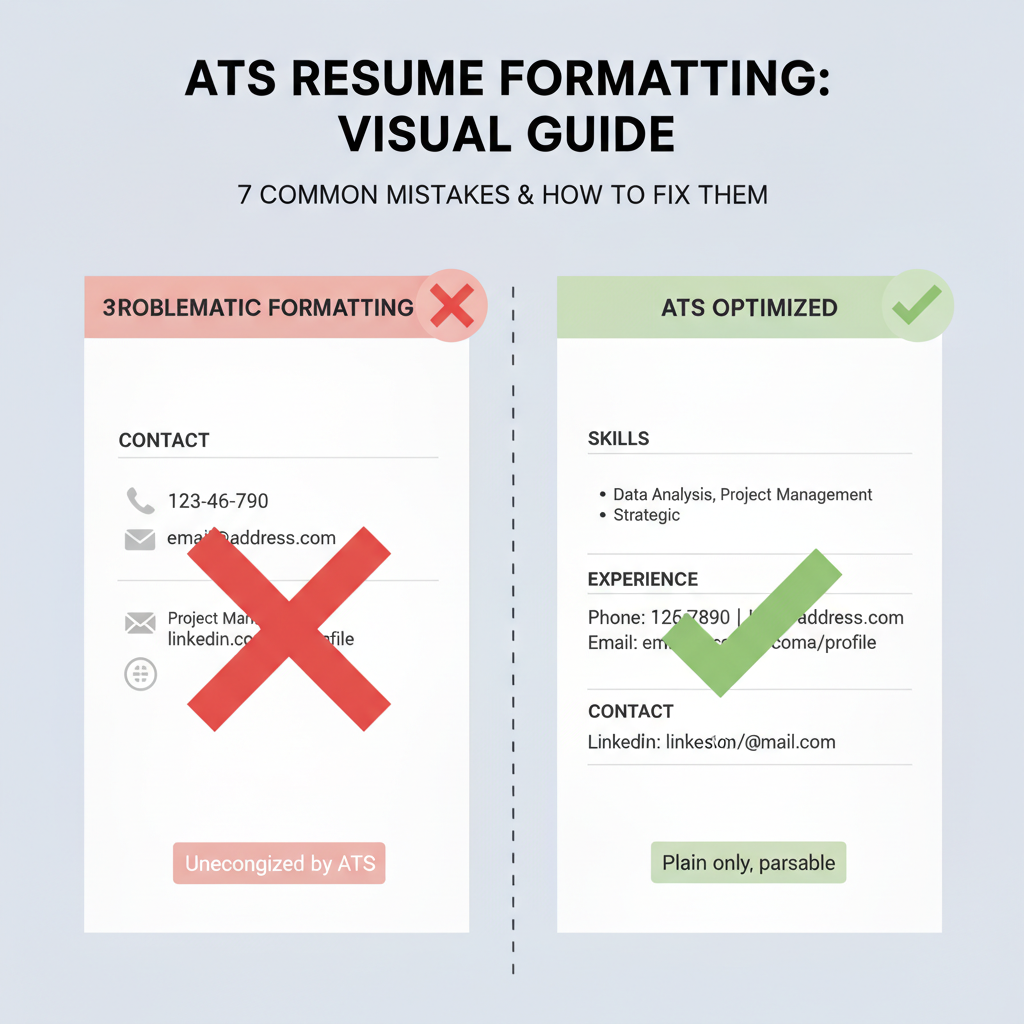
Even qualified candidates lose opportunities due to preventable formatting errors. Understanding these common mistakes helps you avoid the digital rejection pile before your resume reaches human reviewers.
Using Tables and Multi-Column Layouts
Tables and multi-column designs create parsing nightmares for ATS systems. The software reads left-to-right across the entire page, jumbling content from different columns into an unreadable mess. Your carefully organized skills section beside your work history becomes gibberish when parsed.
Quick fix: Use single-column layouts with clear section breaks. Stack information vertically rather than spreading it horizontally across the page.
Embedding Images, Charts, and Graphics
Visual elements like headshots, infographics, or skill charts look impressive but are invisible to ATS systems. The software cannot parse visual content, meaning any information contained in images simply disappears during processing.
Quick fix: Convert all visual information to text. Use written descriptions instead of charts, and skip profile photos entirely unless specifically requested.
Placing Critical Information in Headers and Footers
Many ATS systems skip header and footer sections entirely during parsing. Contact details, job titles, or other key information placed in these areas may never reach the database.
Quick fix: Keep all essential information—especially your name, contact details, and core qualifications—in the main body of your resume. Reserve headers and footers for page numbers only, if needed.
Using Special Characters and Symbols
Decorative elements like bullets (•), dividers (|), or fancy symbols (★) often confuse parsing algorithms. The system may misinterpret these characters or strip them out entirely, disrupting your resume's structure.
Quick fix: Stick to standard keyboard characters. Use simple hyphens or asterisks for bullets, and avoid decorative fonts or symbols.
Choosing Unusual or Decorative Fonts
Creative typography might showcase your design skills, but uncommon fonts create parsing errors. ATS systems work best with standard, widely recognized typefaces.
Quick fix: Use simple, professional fonts like Arial, Calibri, Times New Roman, or Georgia. Keep font sizes between 10-12 points for body text and 14-16 points for headings.
Creating Custom Section Headings
Labeling your work history as "Career Journey" or your skills as "Superpowers" might seem creative, but ATS systems look for standard terminology. Non-traditional headings prevent proper categorization of your information.
Quick fix: Use conventional section names like "Work Experience," "Education," "Skills," and "Professional Summary." The software is programmed to recognize these standard labels.
Saving in Incompatible File Formats
While file format deserves its own detailed discussion, it's worth noting here that certain formats create immediate parsing problems. The wrong choice can render an otherwise perfect resume unreadable.
Quick fix: Default to standard document formats unless the job posting specifies otherwise. Avoid password-protected files, which many systems cannot open.
Each of these mistakes alone can derail your application. Combined, they virtually guarantee your resume won't make it past the initial screening. The good news? Every single error has a simple, straightforward solution that maintains professional presentation while ensuring ATS compatibility.
Sources
Testing and Optimizing Your Resume for ATS Success
Creating an ATS-friendly resume isn't a one-and-done process. The most effective approach involves testing, analyzing results, and refining your document until it performs optimally with both automated systems and human reviewers.
How to Test Your Resume for ATS Compatibility
The simplest and most revealing test is converting your resume to plain text. Copy your entire resume and paste it into a basic text editor like Notepad or TextEdit. This stripped-down version shows you exactly what an ATS sees when it parses your document.
Look for formatting issues in the plain-text version. If your contact information appears scrambled, section headings are missing, or bullet points have turned into strange symbols, those are red flags. Your carefully crafted resume might be getting mangled during the parsing process.
Another practical test is to save your resume as a PDF and reopen it. Check whether all text remains selectable and searchable. If any portion of your text can't be highlighted with your cursor, ATS systems likely can't read it either.
What to Look for in Parsed Results
When reviewing your test results, focus on whether information landed in the correct categories. Your work experience should appear under employment history, not scattered throughout the document. Education details should be grouped together, and skills should be easily identifiable.
Pay special attention to dates and job titles. If these elements appear out of order or separated from their associated positions, you'll need to simplify your formatting. ATS systems rely on proximity and clear hierarchy to categorize information correctly.
Contact information deserves particular scrutiny. Your name, phone number, email, and location should appear clearly at the top of the parsed version. If any of these critical details are missing or misplaced, hiring managers won't be able to reach you regardless of how qualified you are.
Iterative Optimization Strategies
Start with small adjustments rather than a complete overhaul. If your plain-text test revealed issues with bullet points, try replacing decorative bullets with simple dashes or asterisks. Test again to see if the problem resolves.
Maintain a clean design with clear hierarchy throughout your optimization process. Use standard fonts, consistent spacing, and conventional section headings. Each change should make your resume more readable for parsing software without sacrificing professional appearance.
Document what works and what doesn't. Keep notes about which formatting choices improved your test results. This knowledge becomes valuable when you need to update your resume or create tailored versions for different applications.
Balancing ATS Optimization and Human Appeal
The goal isn't to create a resume that only robots can love. Remember that if your resume successfully passes ATS screening, a real person will read it next. That human reviewer needs to be impressed.
Use white space strategically to create visual breathing room. While you're avoiding complex formatting that confuses ATS systems, you can still create an aesthetically pleasing document through thoughtful spacing and clear section breaks.
Choose one or two subtle design elements that enhance readability without compromising parseability. A thin horizontal line separating major sections or slightly bolded section headings can guide human eyes without confusing automated systems.
Your content quality matters more than ever once you've optimized for ATS. Strong action verbs, quantifiable achievements, and relevant keywords serve double duty—they help you rank well in ATS algorithms while demonstrating your value to hiring managers.
Test your resume with both perspectives in mind. After confirming it parses correctly, print it out or view it on different devices. Ask yourself whether a hiring manager would find it easy to scan and engaging to read. The sweet spot is a resume that sails through ATS screening and immediately captures human attention.
Sources
Conclusion
Mastering resume layout tips isn't about choosing between aesthetics and functionality—it's about understanding that visibility comes first. With nearly 99% of Fortune 500 companies relying on applicant tracking systems, your resume must pass digital screening before any human ever sees your qualifications. The good news? ATS-friendly formatting doesn't mean sacrificing professionalism or impact.
Throughout my years in recruitment, I've witnessed the transformation that proper formatting creates. One of my clients went from zero responses to three interviews within two weeks—same qualifications, same experience, just better formatting. The key wasn't dumbing down their resume; it was making it readable for both software and humans. About 75% of resumes never make it past applicant tracking systems, but yours doesn't have to be among them.
Implement These Strategies Today
The nine essential strategies we've covered—from choosing clean layouts and standard fonts to optimizing keywords and testing your format—work together to dramatically improve your callback rates. Start by reviewing your current resume against the common mistakes we identified. Replace complex templates with simple, single-column designs. Use standard section headings. Save your file as a .docx or PDF with text recognition. These small changes create significant results.
Your resume represents your professional story, and it deserves to be seen. By applying these resume layout tips, you're not just formatting a document—you're opening doors to opportunities that were previously closed by invisible digital gatekeepers. The investment of a few hours to optimize your resume format can transform months of frustrating job searching into a focused path toward your next career move. Format for the machine, write for the person, and watch your interview invitations multiply.
Sources

Written by
Emily Johnson
Published March 3, 2026 · 29 min read
Emily Johnson is a seasoned career strategist with over a decade of experience in recruitment and talent acquisition. With a background in human resources, she excels at helping professionals refine their job search strategies, from crafting compelling resumes to mastering interview techniques. As an expert in Applicant Tracking Systems (ATS), Emily is dedicated to guiding individuals toward their dream careers.
Want this kind of read on your résumé?
We'll tell you what's actually working, what's holding you back, and what to fix — in plain English.
Get My Job Match ScoreYou Might Also Like
More articles to help you advance your career
ATS Myths: Surprising Practical Misconceptions Debunked
Discover the truth about ATS myths and learn how applicant tracking systems really work with our practical guide to common misconceptions and realities.

Project Manager Resume Template: 12 Surprising Practical Tips
Master your project manager resume template with 12 surprising practical tips. Learn proven strategies to craft a standout application that gets results.

Data Analyst Resume Template: 12 Surprising Practical Tips
Discover why a generic data analyst resume template won't work and learn 12 surprising, practical tips to tailor your resume for career success.

Role Targeted Resume: Best Expert Guide for Job Applications
Master the role targeted resume approach to enhance your job applications. Learn expert strategies to optimize resumes for specific roles and industries.